
欢迎阅读我们关于 Debezium 信号和通知系列的专题文章!这篇博文是本系列的第二部分,我们将讨论如何在 Debezium 中自定义信号和通知通道。
Debezium 2.3 引入了信号和通知功能的最新改进。除了 Debezium 提供的预定义信号和通知通道外,您还可以设置新的信号和通知通道。此功能使用户能够根据其独特需求定制系统,并将其与现有基础设施或第三方解决方案结合使用。通过精确捕获和通信信号事件并通过首选通道触发通知,它可以实现有效的监控和对数据更改的积极响应。
本系列的的第一篇文章 Debezium 信号和通知 提供了 Debezium 中信号和通知功能的概述。它还讨论了可用的通道及其在各种场景中的用例。
自定义信号与通知通道
在 Debezium 中,可以自定义信号和通知通道以满足特定需求。例如,我们可以通过创建用于信号和通知的 HTTP 通道来实现自定义。此 HTTP 通道通过 http 端点接收信号,并在信号传递后将通知发送回该端点。
让我们通过一个示例来探索如何使用 Debezium Postgres 连接器、Mock Server(用于发送信号)和 Postbin(用于通过 http 端点接收通知)来创建和利用 HTTP 信号和通知通道。
设置 HTTP 信号通道
-
配置 Debezium Postgres 连接器,以便在发生相关数据库更改时接收信号。
-
设置一个服务,使用
HTTP通道将信号发送到 Debezium。该服务可以是数据库、第三方应用程序或任何可以发送 http 请求的其他系统。在此示例中,我们将使用 Mock Server 将信号发送到 Debezium。Mock Server 是一个可用于模拟 http 请求和响应的服务。 -
配置 Mock Server,使其通过 http 端点使用适当的 HTTP 方法(例如 POST)发送信号。
-
自定义
HTTP通道设置,以根据需要定义 http 端点 URL、身份验证、标头和任何其他参数。
设置 HTTP 通知通道
-
一旦 Debezium 接收并处理了信号,它就可以触发将通知发布到 http 端点。在此示例中,我们将使用
HTTP通道将通知发送到 Postbin bin。Postbin 是一个可用于接收 http 请求并查看请求详细信息的服务。 -
自定义通知的
HTTP通道设置,在 Postbin 中创建一个 bin,并根据需要定义 http 端点 URL、身份验证、标头和任何其他参数。 -
使用适当的 HTTP 方法(例如 POST)将通知事件转发到 http 端点,即 Postbin bin。通知负载可根据需要进行自定义。
此博客文章中此示例的完整源代码可在 Debezium 示例存储库的 http-signal-notification 目录下找到。
创建一个 java 项目来构建 HTTP 信号和通知通道。运行以下命令使用 Maven 创建一个新的 java 项目
mvn archetype:generate
    -DgroupId=io.debezium.examples
    -DartifactId=http-signaling-notification
将以下依赖项添加到 pom.xml 文件中,并指定 Debezium 版本(2.3 及更高版本)
<dependency>
    <groupId>io.debezium</groupId>
    <artifactId>debezium-core</artifactId>
    <version>2.3.0.Final</version>
</dependency>
要使用 Mock Server 接收信号,请创建一个定义 Mock Server 服务的 Docker Compose 文件。Mock Server 服务的配置将如下所示
services:
  mockServer:
    image: mockserver/mockserver:latest
    ports:
      - 1080:1080
    environment:
      - MOCKSERVER_WATCH_INITIALIZATION_JSON=true
      - MOCKSERVER_INITIALIZATION_JSON_PATH=/config/initializerJson.json
    volumes:
        - ./initializerJson.json:/config/initializerJson.json
环境变量 MOCKSERVER_WATCH_INITIALIZATION_JSON 和 MOCKSERVER_INITIALIZATION_JSON_PATH 被设置为使 Mock Server 能够监视初始化 JSON 文件中的更改并指定其路径。initializerJson.json 文件(其中包含信号的 http 请求和响应信息)被挂载到 Mock Server 容器中。
initializerJson.json 文件定义了一个到路径 /api/signal 的 mock http 请求,该请求带有查询字符串参数 code=10969。当 Mock Server 接收到此请求时,它将响应一个包含 id、type 和 data 的 JSON 主体。响应的状态码为 200,表示成功响应。initializerJson.json 文件的定义如下
[
  {
    "httpRequest" : {
      "method" : "GET",
      "path" : "/api/signal",
      "queryStringParameters" : {
        "code" : ["10969"]
      }
    },
    "httpResponse" : {
      "body": "{\"id\":\"924e3ff8-2245-43ca-ba77-2af9af02fa07\",\"type\":\"log\",\"data\":{\"message\": \"Signal message received from http endpoint.\"}}",
      "statusCode": 200
    }
  }
]-
id:一个任意唯一的字符串,用于标识信号实例。 -
type:要发送的信号类型。在此示例中,类型为log,它请求连接器将条目添加到连接器的日志文件中。信号处理后,连接器会在日志中打印指定的 [消息](https://debezium.cn/documentation/reference/2.5/connectors/postgresql.html#postgresql-signals)。 -
data:要传递给信号事件的 JSON 格式参数。在此示例中,将message参数传递给信号事件。
通过实现 SignalChannelReader 接口来创建 HTTP 信号通道,如下所示
public class HttpSignalChannel implements SignalChannelReader {
    private static final Logger LOGGER = LoggerFactory.getLogger(HttpSignalChannel.class);

    public static final String CHANNEL_NAME = "http";
    private static final List<SignalRecord> SIGNALS = new ArrayList<>();
    public CommonConnectorConfig connectorConfig;

        @Override
    public String name() { (1)
        return CHANNEL_NAME;
    }

    @Override
    public void init(CommonConnectorConfig connectorConfig) { (2)
        this.connectorConfig = connectorConfig;
    }

    @Override
    public List<SignalRecord> read() { (3)
        try {
            String requestUrl = "http://mockServer:1080/api/signal?code=10969";

            // send http request to the mock server
            HttpClient httpClient = HttpClient.newHttpClient();
            HttpRequest request = HttpRequest.newBuilder()
                    .uri(URI.create(requestUrl))
                    .GET()
                    .header("Content-Type", "application/json")
                    .build();

            // read the response
            HttpResponse<String> response = httpClient.send(request, HttpResponse.BodyHandlers.ofString());
           if (response.statusCode() == 200) {
               ObjectMapper mapper = new ObjectMapper();
               String responseBody = response.body();

               // parse the response body
               JsonNode signalJson = mapper.readTree(responseBody);
               Map<String, Object> additionalData = signalJson.has("additionalData") ? mapper.convertValue(signalJson.get("additionalData"), new TypeReference<>() {}) : new HashMap<>();
               String id = signalJson.get("id").asText();
               String type = signalJson.get("type").asText();
               String data = signalJson.get("data").toString();
               SignalRecord signal = new SignalRecord(id, type, data, additionalData);

               LOGGER.info("Recorded signal event '{}' ", signal);

               // process the signal
               SIGNALS.add(signal);
                } else {
                    LOGGER.warn("Error while reading signaling events from endpoint: {}", response.statusCode());
                }
            } catch (IOException | InterruptedException e) {
                LOGGER.warn("Exception while preparing to process the signal '{}' from the endpoint", e.getMessage());
                e.printStackTrace();
            }
        return SIGNALS;
        }

    @Override
    public void close() { (4)
       SIGNALS.clear();
    }
}| 1 | name() 方法返回信号通道的名称。要使 Debezium 使用该通道,请在连接器的 signal.enabled.channels 属性中指定名称 http。 |
| 2 | init() 方法可用于初始化 http 通道所需的特定配置、变量或连接。 |
| 3 | read() 方法从 http 端点读取信号,并返回一个 SignalRecord 对象列表,这些对象将由 Debezium 连接器处理。 |
| 4 | close() 方法关闭所有分配的资源。 |
通过实现 NotificationChannel 接口来创建通知通道,如下所示
public class HttpNotificationChannel implements NotificationChannel {
    private static final Logger LOGGER = LoggerFactory.getLogger(HttpNotificationChannel.class);

    public static final String CHANNEL_NAME = "http";
    private static final String NOTIFICATION_PREFIX = "[HTTP NOTIFICATION SERVICE]";

    @Override
    public String name() { (1)
        return CHANNEL_NAME;
    }

    @Override
    public void init(CommonConnectorConfig config) { (2)
        // custom configuration
    }

    @Override
    public void send(Notification notification) { (3)
        LOGGER.info(String.format("%s Sending notification to http channel", NOTIFICATION_PREFIX));
        String binId = createBin();
        sendNotification(binId, notification);
    }

    private static String createBin()  {
        // Create a bin on the server
        try {
            HttpRequest request = HttpRequest.newBuilder()
                    .uri(new URI("https://www.toptal.com/developers/postbin/api/bin"))
                    .POST(HttpRequest.BodyPublishers.ofString(" "))
                    .build();

            HttpClient httpClient = HttpClient.newHttpClient();
            HttpResponse<String> response = httpClient.send(request, HttpResponse.BodyHandlers.ofString());

            if (response.statusCode() == HTTP_CREATED) {
                String binId = response.body().replaceAll(".*\"binId\":\"([^\"]+)\".*", "$1");
                LOGGER.info("Bin created: " + response.body());
                return binId;
            }
        } catch (URISyntaxException | InterruptedException | IOException e) {
            throw new RuntimeException(e);
        }
        return null;
    }

    private static void sendNotification (String binId, Notification notification) {
        // Get notification from the bin
        try {
            ObjectMapper mapper = new ObjectMapper();
            String notificationString = mapper.writeValueAsString(notification);
            HttpRequest request = HttpRequest.newBuilder()
                    .uri(new URI("https://www.toptal.com/developers/postbin/" + binId))
                    .header("Content-Type", "application/json")
                    .POST(HttpRequest.BodyPublishers.ofString(notificationString))
                    .build();

            HttpClient httpClient = HttpClient.newHttpClient();
            HttpResponse<String> response = httpClient.send(request, HttpResponse.BodyHandlers.ofString());

            if (response.statusCode() == HTTP_OK) {
                LOGGER.info("Notification received : " + response.body());
            }
        } catch (URISyntaxException | InterruptedException | IOException e) {
            throw new RuntimeException(e);
        }
    }

    @Override
    public void close() { (4)
    }
}| 1 | name() 方法返回通知通道的名称。要使 Debezium 使用该通道,请在连接器的 notification.enabled.channels 属性中指定 http。 |
| 2 | init() 方法可用于初始化该通道所需的特定配置、变量或连接。 |
| 3 | send() 方法将通知发送到通道。通知包含由 Debezium 连接器处理的 SignalRecord 对象。 |
| 4 | close() 方法关闭所有分配的资源。 |
在 META-INF/services 目录下,分别为 io.debezium.pipeline.signal.channels.SignalChannelReader 和 io.debezium.pipeline.notification.channels.NotificationChannel 文件声明 HTTP 信号和通知通道。
编译并导出 Java 项目为一个 JAR 文件。可以使用 Maven 或你喜欢的构建工具来完成。将 JAR 文件复制到包含你要使用的 Debezium 连接器 JAR 文件的目录中。例如,如果你想将自定义信号和通知通道与 Debezium Postgres 连接器一起使用,请将 JAR 文件复制到 /kafka/connect/debezium-connector-postgres 目录。
此示例提供了一个 Docker Compose 文件,其中包含必要的服务定义,包括 Mock Server、Zookeeper、Kafka Connect 和 Postgres 数据库。
要启动服务,请运行以下命令
export DEBEZIUM_VERSION=2.3
docker-compose up -d
在确保服务已启动并正在运行,并且 Postgres 数据库已准备好接受连接后,下一步是注册连接器。这涉及到创建一个连接器配置文件。让我们创建一个名为 register-postgres.json 的文件,其中包含以下属性
{
  "name": "inventory-connector",
  "config": {
    "connector.class": "io.debezium.connector.postgresql.PostgresConnector",
    "tasks.max": 1,
    "database.hostname": "postgres",
    "database.port": 5432,
    "database.user": "postgres",
    "database.password": "postgres",
    "database.dbname" : "postgres",
    "topic.prefix": "dbserver1",
    "schema.include.list": "inventory",
    "signal.enabled.channels": "http", (1)
    "notification.enabled.channels": "http" (2)
  }
}| 1 | signal.enabled.channels 属性指定连接器要使用的信号通道。在这种情况下,连接器使用 http 信号通道。 |
| 2 | notification.enabled.channels 属性指定连接器要使用的通知通道。在这种情况下,连接器使用 http 通知通道。 |
现在我们已经准备好了连接器配置文件,可以通过执行以下命令继续向 Kafka Connect 注册连接器
curl -i -X POST -H "Accept:application/json" \
    -H  "Content-Type:application/json" https://:8083/connectors/ \
    -d @register-postgres.json
连接器成功注册后,您可以查看连接器日志以观察信号事件。日志提供了对连接器处理和进度的见解,包括任何与信号相关的信息。您会遇到类似的日志消息
Recorded signal event 'SignalRecord{id='924e3ff8-2245-43ca-ba77-2af9af02fa07', type='log', data='{"message":"Signal message received from http endpoint."}', additionalData={}}' [io.debezium.examples.signal.HttpSignalChannel]此外,您可能会注意到与发送到 Postbin 的通知事件相关的日志消息。例如
[HTTP NOTIFICATION SERVICE] Sending notification to http channel   [io.debezium.examples.notification.HttpNotificationChannel]
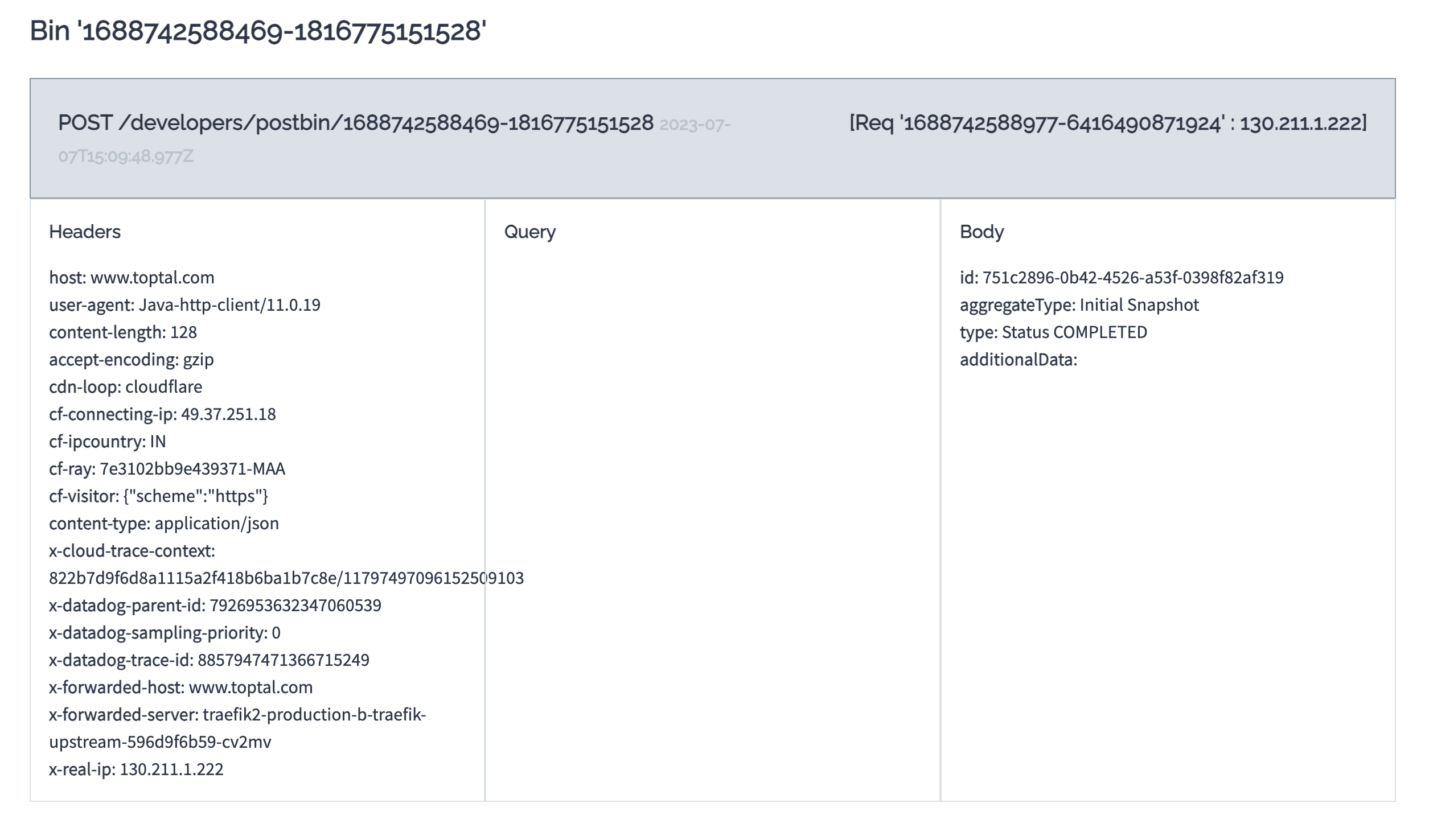
Bin created: {"binId":"1688742588469-1816775151528","now":1688742588470,"expires":1688744388470}   [io.debezium.examples.notification.HttpNotificationChannel]
它提供了关于通知事件的信息,例如创建了一个具有唯一标识符 (binId) 的 bin 和其他相关详细信息。要从 Postbin 检索通知事件,请从日志消息中获取 binId,并使用它向 Postbin 请求相应的通知事件。要查看通知事件,您可以通过以下 URL 访问 Postbin:https://www.toptal.com/developers/postbin/b/:binId。将 URL 中的 :binId 替换为从连接器日志中获得的实际 binId。
发送到 Postbin 的通知事件如下所示
结论
在本教程中,我们探讨了如何为 Debezium 连接器创建自定义信号和通知通道。我们创建了一个自定义信号通道,该通道从 HTTP 端点接收信号事件。我们还创建了一个自定义通知通道,该通道将通知事件发送到 HTTP 端点。
Debezium 强大的信号和通知系统提供了与第三方解决方案的无缝集成,使用户能够及时了解 Debezium 连接器的状态和进度。该系统的可扩展性使用户能够自定义信号和通知通道以适应其定制需求。
请继续关注本系列的第三部分,届时我们将探讨 JMX 信号和通知。在此期间,您可以查阅 Debezium 文档,了解有关信号和通知通道的更多信息。
如果您有任何问题或反馈,请随时通过 Debezium 邮件列表或 Zulip 聊天中的 #community-general 频道与我们联系。我们很乐意听取您的意见!
关于 Debezium
Debezium 是一个开源的分布式平台,可以将现有数据库转变为事件流,使应用程序能够几乎即时地看到并响应数据库中已提交的每个行级更改。Debezium 构建在 Kafka 之上,并提供了 Kafka Connect 兼容的连接器,用于监控特定的数据库管理系统。Debezium 将数据更改的历史记录在 Kafka 日志中,这样您的应用程序可以随时停止和重新启动,并可以轻松地消费在未运行时错过的所有事件,确保所有事件都被正确且完整地处理。Debezium 在 Apache 许可证 2.0 下是 开源 的。
